Reviewed · TOKYO
Japan: eSIM with Unlimited Local 4G/5G Data
Japan is one of the easiest countries to explore with mobile data, and this KDDI au eSIM gives you a working connection without hunting for a shop or swapping a tiny plastic SIM card. You order online, receive a separate QR code by email, install it, and connect after you land.
In This Article
- Key points to know before buying
- What this Japan eSIM actually provides
- Ultra or Lite: choosing the right speed
- Installing the eSIM before you fly
- Arrival day and the calendar clock
- Coverage for trains, cities, and daily exploring
- Hotspot sharing and the limits that matter
- Troubleshooting the QR code and connection
- How the $10 price fits your Japan budget
- Who should choose this eSIM
- Should you book this Japan eSIM?
- FAQ
- Does this eSIM include unlimited data?
- Does the eSIM include phone calls or SMS?
- When will I receive the eSIM QR code?
- Can I install the eSIM before arriving in Japan?
- How can I check if my phone supports eSIM?
- How long are the plans valid?
- Does the service work on 5G everywhere?
- Can I share the eSIM connection with another device?
I like the unlimited local data, which is handy for maps, translation, train information, restaurant searches, and messaging. I also like the choice between Ultra and Lite, since a light user may not need full 5G speed. The main catch is that the QR code arrives one day before your activity date, and the service counts by calendar day, not by 24-hour periods.
Key points to know before buying
- KDDI au network: You connect to local 4G and 5G service across Japan.
- Two data options: Ultra has unthrottled data, while Lite is unlimited but capped at 10Mbps.
- Separate QR code delivery: The voucher QR code is not the eSIM code. Watch for another email one day before use.
- Calendar-day billing: A connection at 10 p.m. counts as a full day by midnight.
- Hotspot sharing is limited: Tethering is available, but the allowance depends on your plan and duration.
- No phone number included: Voice calls and SMS are not part of the service.
What this Japan eSIM actually provides
This is a data-only eSIM for Honshu and the rest of Japan covered by the KDDI au network. You do not receive a Japanese phone number, voice service, or SMS messaging. Your regular phone number can remain available if your device supports dual SIM use, but mobile data comes from this eSIM.
For most visitors, that is enough. You can use Google Maps or another map app, search train routes, translate signs, check opening hours, send messages through internet apps, and call hotels or restaurants through data-based services. You can also share your connection with another device, though hotspot use has limits.
The service is offered at $10 per person. That is a low entry price for reliable data, but check the exact plan and number of days before comparing it with airport SIM cards, pocket Wi-Fi, or your home carrier’s roaming package. The value is strongest if you want immediate data and do not want to collect or return hardware.
If you're still narrowing it down, here are other tours in Tokyo we've reviewed.



Ultra or Lite: choosing the right speed
The Ultra plan offers unlimited 5G and 4G local data without throttling. This is the better choice if you expect to use your phone heavily, upload photos, watch video, share data with another device, or simply want the least fuss about speed.
The Lite plan also provides unlimited local data, but its maximum speed is 10Mbps. That is usually enough for maps, translation, email, web browsing, messaging, and ordinary social media use. It may feel slower when you stream high-quality video, upload large files, or connect several devices.
Both plans are data-only. Neither includes calls or SMS. You can still use internet calling and messaging apps when the other person has a data connection or when you are on Wi-Fi.
Plan lengths differ. Ultra is available for 3 to 30 days. Lite is available for 3 to 10 days. That makes Ultra the only choice for a trip longer than 10 days, unless you arrange another data solution after the first part of your visit.
Installing the eSIM before you fly
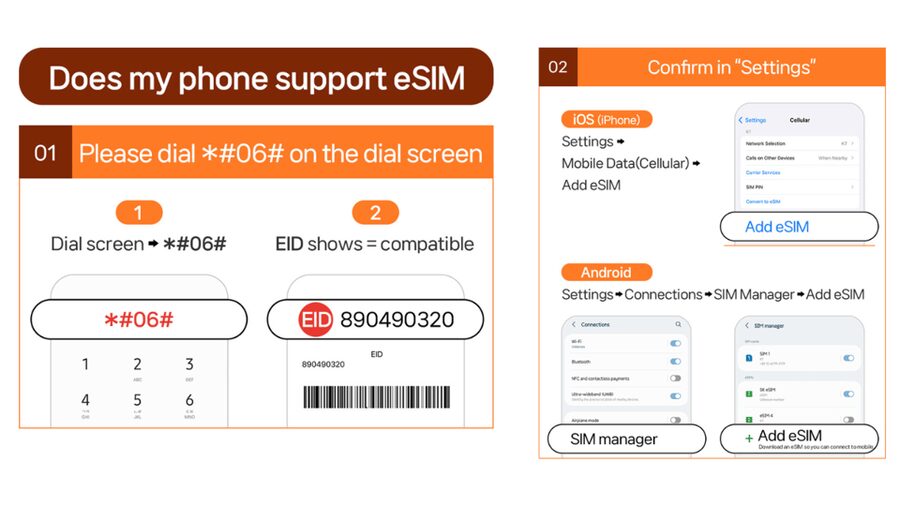
Your first job is to confirm that your phone accepts eSIMs. On the phone dial screen, press #06#. If an EID number appears, the device supports eSIM according to the supplied instructions. You also need an unlocked phone that accepts a foreign SIM or eSIM.
Do this check before buying. Once the eSIM QR code has been sent, refunds are not accepted. It is also wise to confirm that your particular phone model and regional version support eSIM, since some devices sold in certain markets do not.
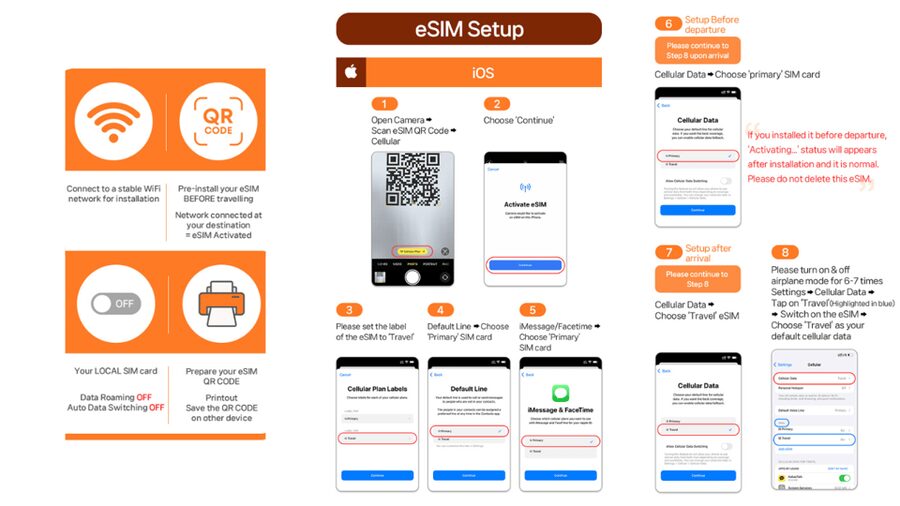
The QR code on your booking voucher is not the installation code. The actual eSIM QR code arrives separately by email one day before the activity date. Keep that message easy to find. You may need a second screen, a computer, or a printed copy so your phone can scan the code.
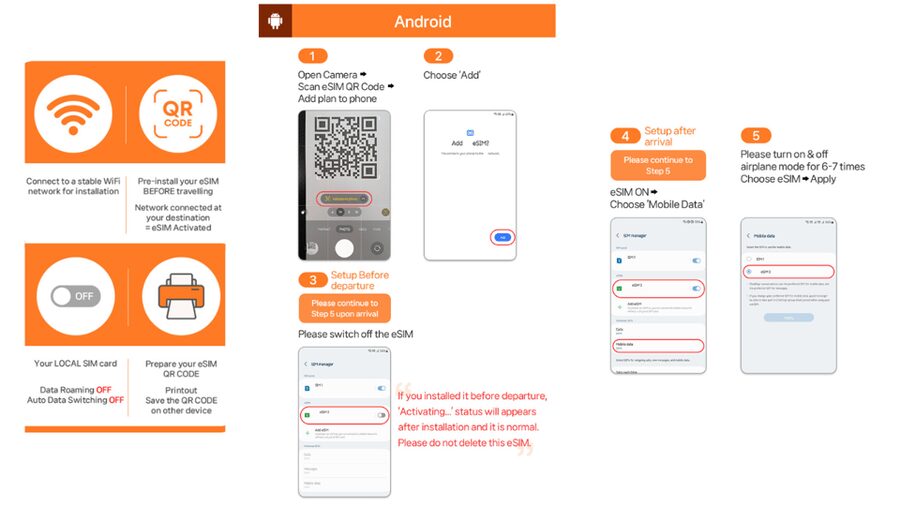
Install the eSIM while you still have Wi-Fi. The phone may ask you to label the new line, select it for mobile data, and enable or disable data roaming depending on the device. Follow the supplied setup guide and keep your regular SIM clearly labeled so you do not confuse the two.
Installing the eSIM is not the same as using it in Japan. It connects to the local network after you arrive in Japan. You can prepare the line before departure, but service begins when it connects to KDDI au in Japan.
Arrival day and the calendar clock
The most important timing detail is the calendar-day calculation. Your validity begins with the first connection to the KDDI au network in Japan. If you activate at 10 p.m., that night counts as one full day, and the next calendar day begins at midnight.
This matters if you are taking a late flight. A three-day plan used for the first time late at night can lose much of its first day within a couple of hours. If your schedule allows, avoid activating early unless you need data immediately. The system is not measuring three rolling 24-hour periods.
The QR code must be installed and activated within 30 days of purchase. That gives you some flexibility, but do not buy far ahead and forget about it. The separate delivery email arrives one day before the selected activity date, so check your inbox and spam folder before flying.
On arrival, set the eSIM as your mobile-data line and look for the KDDI au connection. The phone may show 4G or 5G depending on the location, device, and network conditions. Indoors, underground, or in crowded areas, 5G may switch to 4G. That is normal and does not mean the plan has stopped working.
Coverage for trains, cities, and daily exploring
KDDI au is a major Japanese mobile network, and this plan is designed for local use in Japan. The supplied coverage area is Japan, and the practical aim is to keep you connected as you move between cities and use public transport.
A stable data connection can make a big difference in Japan. Train routes often involve several lines, station exits can be confusing, and useful information may be posted in Japanese first. With data, you can check a route before leaving the station, translate a menu, save a map, or contact your accommodation without searching for Wi-Fi.
One especially useful detail is subway access. An easy setup and signal in subway areas were praised by Aaron, who found the connection available even on the subway. You should still expect occasional changes from 5G to 4G underground or in crowded stations, but a 4G connection is generally sufficient for maps and messages.
Do not read unlimited as a guarantee of perfect service in every place. Signal depends on the local network, the building, underground conditions, and congestion. The plan removes a data cap on the Ultra option, but it cannot remove physical limits caused by location.





Hotspot sharing and the limits that matter
Hotspot sharing is included, which is useful if you are carrying a tablet, laptop, or a companion’s phone. It also gives you a way to connect several devices without buying a second physical SIM.
The catch is that tethering is limited by plan and duration. The listed hotspot allowances are:
- 3-day plan: 3GB
- 4-day plan: 3GB
- 5-day plan: 4GB
- 6-day plan: 5GB
- 7-day plan: 6GB
- 8-day plan: 7GB
- 9-day plan: 8GB
- 10-day plan: 9GB
- 15-day plan: 15GB
- 20-day plan: 19GB
- 30-day plan: 30GB
These limits are separate from the unlimited local data available on the phone itself. If you only share occasional maps or messages, the allowance should be easier to manage. A laptop used for video calls, cloud backups, or large downloads can consume it quickly.
For two people, one eSIM with hotspot may be enough if you use it carefully. If both of you need constant independent access, buying separate eSIMs gives each phone its own connection and avoids making one device a permanent hotspot.
Troubleshooting the QR code and connection
The setup should be straightforward, but the instructions include a useful fix for a common problem. If the phone says QR code is invalid, check the device settings before assuming the code has failed.
On an iPhone, look under Settings, then Cellular. On an Android phone, go to Settings, Connections, then SIM Manager. Look for a newly added eSIM. Sometimes the phone has accepted the installation even though the scan screen displays an error.
If you still cannot use the service, contact the supplier by email or WhatsApp. Do this before deleting the eSIM from your phone. A deleted eSIM may not be easy to reinstall, and the QR code has a limited validity period.
Prepare as much as possible before departure. Confirm the phone is unlocked, install the eSIM over Wi-Fi, save the setup guide, and keep the supplier’s contact information available offline. These small steps are more useful than trying to solve a network problem while standing in an unfamiliar airport.
How the $10 price fits your Japan budget
At $10 per person, this is an attractive way to cover basic mobile data. You avoid rental deposits, pickup counters, return deadlines, and the need to carry a separate pocket Wi-Fi device. You also avoid the hassle of removing your regular SIM card.
The value depends on how long you need service and which option you choose. A short trip with modest data needs can make the Lite plan a sensible budget choice. A longer trip, heavy data use, or frequent hotspot use points toward Ultra.
The price is less appealing if your home carrier already includes generous Japan roaming at no extra charge. It may also be less convenient for someone whose phone does not support eSIM, since compatibility is non-negotiable.
Think of the plan as a practical tool rather than a complete phone replacement. You get data, not a Japanese number. If a hotel or business requires a normal voice call or SMS, you may need Wi-Fi calling, an internet calling app, or another option.
Who should choose this eSIM
I would look closely at this plan if you want to land in Japan with mobile data already arranged. It suits independent visitors who rely on maps, translation, train information, online tickets, and messaging throughout the day.
It is also a good fit for anyone who dislikes handling physical SIM cards. There is no card to lose and no need to open the phone’s SIM tray. Families and couples may find hotspot sharing useful, as long as they understand the tethering allowance.
The Lite option suits people who mainly need navigation and communication. Choose Ultra if speed matters, you use a lot of media, or you expect to share data regularly.
I would pause before buying if your phone compatibility is uncertain, if you need voice and SMS, or if you are likely to activate late on arrival and want a full 24-hour period. The calendar-day rule can make a short plan less generous than it first appears.
Should you book this Japan eSIM?
Book it if you have an unlocked eSIM-compatible phone and want a simple data connection for Japan at a low price. The strongest points are the quick QR-code setup, KDDI au coverage, unlimited phone data, and the choice between full-speed Ultra and capped Lite.
Choose carefully. Confirm your phone’s EID, watch for the separate QR-code email, and remember that the voucher QR code is not the installation code. For a short, light-use trip, Lite should cover the basics. For heavy use or more than 10 days, Ultra is the safer pick.
The experience earns its strong 4.5 rating from 163 ratings for good reason: it solves a common travel problem with little equipment. Just treat the calendar-day clock, hotspot limits, and lack of voice service as part of the deal.
FAQ
Does this eSIM include unlimited data?
Yes. Both options include unlimited local 4G and 5G data in Japan. Ultra has unthrottled data, while Lite has a maximum speed of 10Mbps.
Does the eSIM include phone calls or SMS?
No. Voice calls and SMS messaging are not included. The service provides mobile data only.
When will I receive the eSIM QR code?
The actual eSIM QR code is delivered separately by email one day before the activity date. The QR code on the booking voucher is not the eSIM installation code.
Can I install the eSIM before arriving in Japan?
Yes, you can install it before departure. The eSIM connects to the local KDDI au network after you arrive in Japan.
How can I check if my phone supports eSIM?
Press #06# on your phone’s dial screen. If an EID appears, the supplied instructions indicate that your phone supports eSIM. Your phone must also be unlocked for a foreign SIM or eSIM.
How long are the plans valid?
Ultra plans last from 3 to 30 days. Lite plans last from 3 to 10 days. The QR code must be installed and activated within 30 days of purchase.
Does the service work on 5G everywhere?
The plan supports 5G and 4G, but the signal can change based on your location. Indoors, underground, or in crowded areas, the phone may switch from 5G to 4G.
Can I share the eSIM connection with another device?
Yes, hotspot sharing is supported with limits. The available hotspot allowance depends on the selected plan and duration, ranging from 3GB on some short plans to 30GB on the 30-day plan.
More tours in Tokyo we've reviewed












Tokyo, compared.
 ★ 5.0Mt Fuji and Hakone 1-Day Bus Tour Return by Bullet TrainFrom $163
 ★ 5.01-Day Tokyo Bus TourFrom $129
 ★ 4.6Tokyo: teamLab Planets TOKYO Digital Art Museum Entry TicketFrom $251 day
 ★ 4.0Mt Fuji & Hakone Cruise, Drum Show Bullet Train 1 Day from TokyoFrom $149
 ★ 5.0Tokyo: Shinjuku Food Tour (13 Dishes at 4 Local Eateries)From $86
 ★ 4.4Tokyo Mt Fuji 5th St & Hakone Cruise Bus Tour w/Bullet TrainFrom $15410 hours